Google Cloud Identity Federation: WIF Vs Workforce Explained

Managing access across multiple cloud environments and identity providers gets complicated fast, especially when your infrastructure handles sensitive healthcare data. Google Cloud Identity Federation solves a specific problem: it lets external identities (from AWS, Azure AD, GitHub, Okta, and others) authenticate into Google Cloud without long-lived service account keys or duplicated user accounts.
But Google actually offers two distinct federation mechanisms, and they serve very different purposes. Workload Identity Federation handles machine-to-machine authentication for applications and CI/CD pipelines. Workforce Identity Federation handles human users who need to sign in through an external identity provider like Azure AD or Okta. Mixing them up, or picking the wrong one, leads to misconfigurations and security gaps.
At VectorCare, we build and host SMART on FHIR applications that integrate directly with EPIC EHR systems, so identity management and HIPAA-compliant infrastructure aren't abstract concepts for us, they're daily operational requirements. This article breaks down both federation types, explains when to use each, and walks through the setup process with common third-party providers so you can implement the right approach for your use case.
Why identity federation matters in Google Cloud
Before you can appreciate what google cloud identity federation solves, you need to understand what happens without it. The traditional approach to cross-system authentication relies on long-lived service account keys: JSON files you generate in Google Cloud, download, and store somewhere in your application or CI/CD pipeline. Those keys don't expire automatically, they can be copied, leaked in a repository, or left sitting in an S3 bucket with weak permissions. Every key you create is a persistent credential that exists outside Google Cloud's security perimeter, and that creates a large attack surface over time.
The problem with long-lived credentials
Most teams don't realize how many service account keys they've accumulated until something goes wrong. A single developer might create three or four keys during a project, forget about two of them, and leave those credentials active indefinitely. At scale, this becomes unmanageable. Google's own security guidance recommends avoiding service account keys wherever possible precisely because rotating, tracking, and revoking them across many projects and environments is operationally difficult.
Eliminating long-lived credentials from your authentication layer removes an entire category of credential-leakage risk from your security posture.
Identity federation solves this by replacing static keys with short-lived tokens. Your workloads or users authenticate through their existing identity provider, receive a token that Google Cloud validates, and then exchange it for temporary access credentials. Those credentials expire after a short window, so even if they're intercepted, the damage window is minimal.
Why Google Cloud specifically requires this approach
Google Cloud's IAM model is built around the concept of least privilege and identity-first access. When you federate external identities into that model, you connect your existing trust hierarchy directly to Google's permission system without creating parallel credential stores. This matters for a few practical reasons.
First, audit logging becomes cleaner. Instead of seeing generic service account activity in Cloud Audit Logs, you see the originating identity from your external provider, which makes incident investigation significantly faster. Second, your access controls stay consistent. If you remove a user from Azure AD or revoke a GitHub Actions environment, that change propagates to their Google Cloud access automatically rather than requiring a separate deprovisioning step.
For organizations operating in regulated industries, these properties aren't just operationally convenient. HIPAA, SOC2, and FedRAMP all include requirements around access control, auditability, and credential management. A federated identity model where credentials are short-lived and access is tied to verified external identities maps cleanly onto those compliance frameworks. If your team is building healthcare applications or handling protected health information, identity federation isn't optional infrastructure, it's a foundational security control that reviewers and auditors will look for when evaluating your environment.
Workload vs workforce identity federation
When you start exploring google cloud identity federation, the first decision you need to make is which federation type applies to your situation. Google Cloud offers two distinct mechanisms: Workload Identity Federation for non-human principals like applications, pipelines, and services, and Workforce Identity Federation for human users. They share the same underlying goal of eliminating long-lived credentials, but they operate in different layers of your architecture and serve fundamentally different authentication scenarios.
Workload Identity Federation
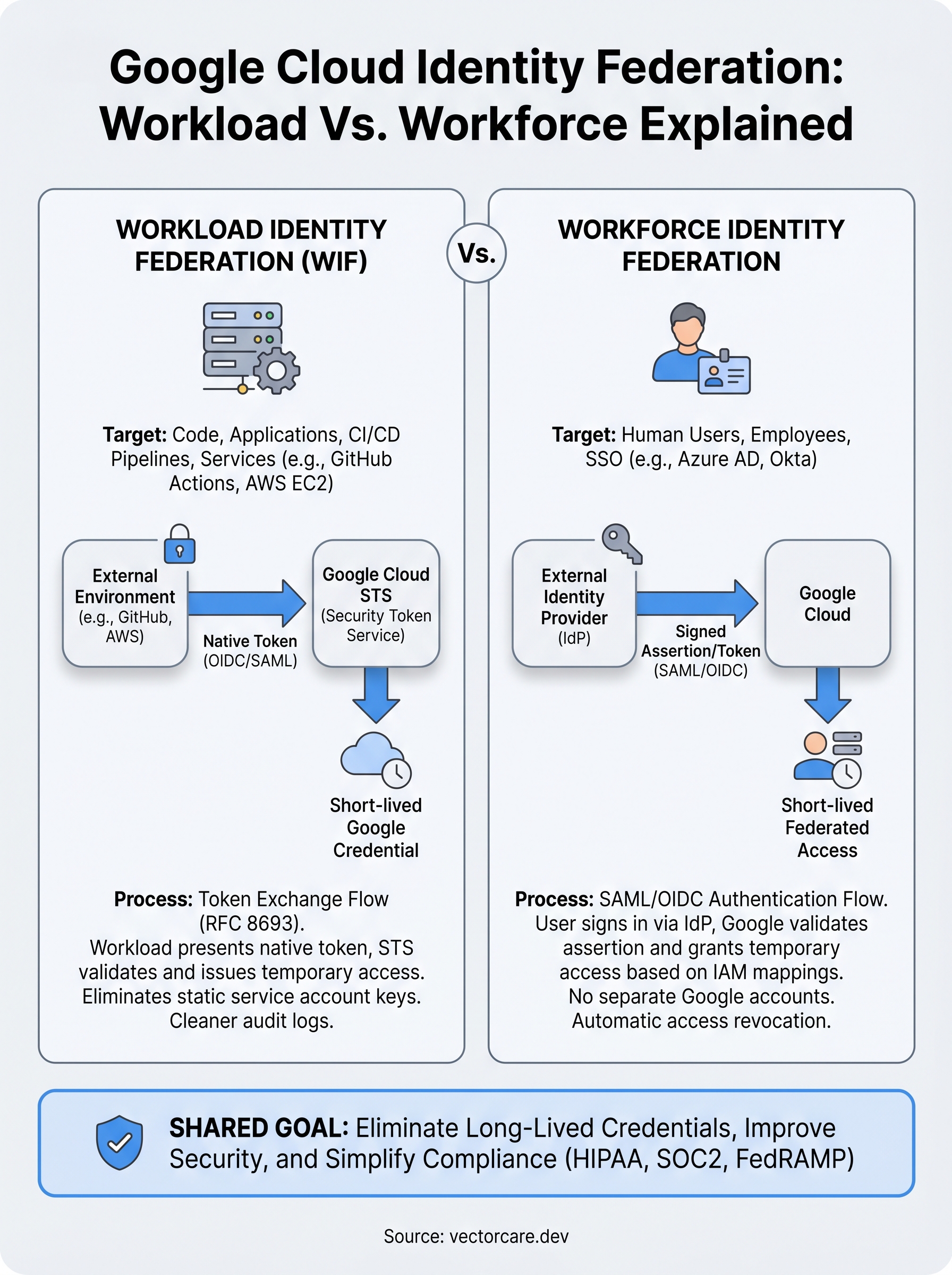
Workload Identity Federation (WIF) is designed for scenarios where code authenticates to Google Cloud rather than a person. Your CI/CD pipeline running on GitHub Actions, a service running on AWS EC2, or an application deployed on Azure all fall into this category. Instead of storing a service account key file, your workload presents a token from its native environment, and Google Cloud validates that token against a configured identity pool before issuing short-lived Google credentials.
Workload Identity Federation eliminates the need to manage, rotate, or revoke JSON key files across your deployment environments.
WIF uses the OIDC or SAML 2.0 protocols to establish trust between Google Cloud and the external identity provider. The workload never receives a permanent credential; it gets a temporary access token scoped to whatever IAM roles you've mapped to that external identity.
Workforce Identity Federation
Workforce Identity Federation is built for human users who need to access Google Cloud resources through an external identity provider like Azure Active Directory, Okta, or a SAML-based SSO system. Instead of creating Google-managed accounts for each user, you map your existing directory to Google Cloud's IAM layer and let users authenticate through their normal login flow.
Your users sign in once through their existing identity provider and receive temporary federated credentials that grant access to Google Cloud resources based on the IAM bindings you've configured. When you deprovision a user in your external directory, their Google Cloud access disappears automatically, which significantly simplifies access governance across your organization.
How Workload Identity Federation works
When working with google cloud identity federation, the Workload Identity Federation mechanism follows a token exchange pattern defined by RFC 8693, the OAuth 2.0 Token Exchange specification. When your workload needs to access a Google Cloud resource, it presents a credential from its native environment (a GitHub Actions OIDC token, an AWS instance identity document, or an Azure managed identity token) to Google's Security Token Service (STS). Google STS validates that token against the trust configuration you've set up in a Workload Identity Pool, then issues short-lived Google credentials in return.
The token exchange flow
Your workload never stores a static key file anywhere. Instead, it follows a three-step process each time it needs to access Google Cloud. First, the workload requests a token from its native environment, which GitHub Actions, AWS, or Azure issues automatically as part of the runtime context. Second, it sends that token to Google's STS endpoint, which checks the token's issuer, audience, and signature against your configured identity pool. Third, STS returns a short-lived access token or, if you need it, allows the workload to impersonate a service account with specific IAM roles attached.

The credentials Google returns expire within minutes or hours depending on your configuration, which means a leaked token has an extremely limited damage window compared to a static key file.
Mapping external identities to IAM roles
Once the token exchange succeeds, Google Cloud maps the external identity to an IAM principal using attribute conditions you define. For a GitHub Actions pipeline, you might map the repository and ref claims from the OIDC token so only workflows running on your main branch can impersonate the target service account. This attribute mapping layer gives you fine-grained control over which workloads receive which permissions, rather than granting broad access to an entire external provider.
You configure this mapping in the Google Cloud Console or via the gcloud CLI when you create the Workload Identity Pool and its associated provider. Google's official documentation on Workload Identity Federation covers the exact attribute mapping syntax for AWS, Azure, and GitHub providers if you need provider-specific examples.
How Workforce Identity Federation works
Workforce Identity Federation handles the human side of google cloud identity federation. Where Workload Identity Federation authenticates code, Workforce Identity Federation authenticates people. Your users sign in through their existing identity provider, whether that's Azure Active Directory, Okta, or any SAML 2.0 or OIDC-compatible system, and Google Cloud validates that authentication before granting access. Your organization never needs to provision separate Google-managed accounts for each person, which eliminates a significant administrative burden, especially for teams that already manage identity centrally in Azure AD or a similar directory.
The SAML and OIDC authentication flow
When a user attempts to access a Google Cloud resource, the Workforce Identity Pool intercepts that request and redirects them to your configured identity provider. The user authenticates through their normal login process, including any MFA your organization enforces at the IdP level. The identity provider then returns a signed SAML assertion or OIDC token to Google Cloud, which validates the token's issuer, expiration, and signature against the trust configuration you've defined. Once validation passes, Google issues the user a short-lived federated credential scoped to whatever IAM permissions you've bound to their identity or group.
The authentication happens entirely through your existing IdP, so your users never interact with a separate Google login page or maintain a second set of credentials.
Mapping users and groups to IAM roles
Workforce Identity Federation lets you map identity provider attributes, such as group membership, department, or job title, directly to IAM role bindings. This means you can grant access to a Cloud Storage bucket for everyone in your Azure AD security group without manually assigning roles to individual users. When someone leaves your organization and you remove them from the group in your directory, their Google Cloud access revokes automatically the next time their federated session expires. Google's documentation on Workforce Identity Federation covers the full attribute mapping syntax and supported providers in detail.
How to set up identity federation step by step
The setup process for google cloud identity federation differs depending on whether you're configuring Workload or Workforce federation, but both follow a similar three-phase pattern: create an identity pool, configure a provider, and bind IAM roles to external identities. You'll need Owner or IAM Admin permissions on your Google Cloud project before you start either process.
Setting up Workload Identity Federation
To configure WIF, open the Google Cloud Console and navigate to IAM & Admin > Workload Identity Federation. Create a new pool, then add a provider by selecting your external system, such as GitHub Actions, AWS, or Azure. You'll define attribute mappings at this step, specifying which claims from the external token map to Google Cloud attributes. For GitHub Actions, map google.subject to assertion.sub so Google can identify the specific repository and branch making the request.
The attribute conditions you set here act as your authorization gate, so be as specific as possible to restrict which workloads can exchange tokens.
Once the provider is saved, grant your service account the Workload Identity User role, scoped to the external identity using a condition expression. In your GitHub Actions workflow, configure the google-github-actions/auth action with your pool and provider resource names. Google's Workload Identity Federation documentation provides the exact YAML configuration for each supported provider.
Setting up Workforce Identity Federation
Workforce federation is configured at the organization level rather than the project level, which means you'll navigate to IAM & Admin > Workforce Identity Pools in the Google Cloud Console. Create a pool, then add an OIDC or SAML provider and paste in your identity provider's metadata URL or certificate. Map group attributes from your IdP, such as Azure AD security groups, to Google Cloud IAM roles using the condition editor.
After the pool and provider are saved, bind specific Cloud IAM roles to the federated principal set using the IAM page on each resource or project you want users to access. Google's Workforce Identity Federation setup guide walks through the exact provider configuration for Azure AD and Okta.
Next steps
Google cloud identity federation gives you a practical path away from long-lived credentials and toward a security model where both your applications and your users authenticate through short-lived, auditable tokens. The two mechanisms, Workload Identity Federation for code and Workforce Identity Federation for people, solve distinct problems, but together they eliminate most of the credential-management risk that plagues cloud environments handling sensitive data.
Your next move is to audit your current Google Cloud projects for active service account keys and identify which workloads or users could shift to federated authentication. Start with the highest-risk environments first, typically your production pipelines and any systems that touch regulated data like protected health information.
If you're building applications that need to integrate with EPIC EHR systems under tight compliance requirements, see how VectorCare handles secure, HIPAA-compliant infrastructure so you can focus on your core product instead of managing integration complexity.
The Future of Patient Logistics
Exploring the future of all things related to patient logistics, technology and how AI is going to re-shape the way we deliver care.
Thank you! Your submission has been received!
Oops! Something went wrong while submitting the form.