
EHR Vendor Selection Checklist: 10 Steps to Choose Right
Picking the wrong EHR vendor costs a practice months of downtime, six-figure implementation fees, and staff who quietly hate the new system for years. That's why a solid ehr vendor selection checklist matters more than any vendor's sales deck. You need a repeatable process for selecting an EHR vendor that separates real fit from a slick demo, and you need it before you sign a contract that locks you in for the next decade.
This guide gives you exactly that: a 10-step evaluation framework covering everything from clinical workflow fit to interoperability standards, security requirements, and total cost of ownership. Instead of vague advice about "finding the right partner," you'll get concrete questions to ask, red flags to watch for, and a scoring method you can use to compare vendors side by side.
We wrote this from the integration side of the market, where we watch health systems evaluate connected apps every day. Most practices land on EPIC or a handful of major platforms, and that decision ripples through every third-party tool you'll add later. Understanding how selection actually works helps you avoid rework and pick a system that plays well with the apps your clinical teams already depend on.
Why you need a structured EHR vendor selection process
The real cost of skipping structure
Most practices treat EHR vendor selection like buying software for the front desk: get a demo, compare price sheets, pick the friendliest sales rep. That approach works fine for scheduling software. It fails badly for a system that touches every clinical encounter, every claim, and every regulatory audit for the next 7 to 10 years. The Office of the National Coordinator for Health IT has tracked implementation failures for over a decade, and the pattern is consistent: practices that skip a formal requirements-gathering phase end up paying for modules they never use while missing features their clinical staff actually needed on day one.
A rushed EHR decision doesn't just cost money upfront, it costs you clinical hours every single day for years.
Where ad hoc evaluations go wrong
Unstructured selection processes tend to fail in the same predictable ways. Vendors know this, and their sales cycles are built to exploit exactly these gaps.
- Decision by demo only: A polished 45-minute walkthrough hides how the system performs during a real 12-patient morning.
- No documented requirements: Without a written list of must-haves, every vendor's pitch sounds equally compelling.
- Single-department input: Physicians, billing staff, and IT get consulted separately, if at all, so nobody catches the workflow gaps until go-live.
- Interoperability treated as an afterthought: Practices assume any certified EHR talks to any other system, then discover their referral network can't exchange records cleanly.
- Contract terms reviewed too late: By the time legal sees the agreement, the practice has already announced the switch internally, killing any real negotiating leverage.
Questioning becomes the antidote to shortcuts. Rather than asking "does this look good," a structured process asks "does this meet requirement 14 on our list, and can the vendor prove it in writing."
Turning selection into a repeatable process
Systematic evaluation means you build weighted EHR vendor selection criteria before you ever schedule a demo, then score every vendor against the same rubric. This is the difference between choosing an EHR system based on gut feeling versus choosing one based on evidence you can defend to your board or your partners.
| Evaluation Category | Typical Weight | What It Covers |
|---|---|---|
| Clinical workflow fit | 30% | Order sets, documentation templates, specialty-specific tools |
| Interoperability & data exchange | 25% | FHIR support, HIE connections, referral network compatibility |
| Security & compliance | 20% | HIPAA safeguards, audit logs, breach history |
| Total cost of ownership | 15% | Licensing, implementation, ongoing support fees |
| Vendor support & training | 10% | Response times, onboarding hours, user community |
Vendors that score well on flashy interfaces but poorly on interoperability create the exact problem this article exists to prevent: a system that works fine in isolation but breaks down the moment you try to connect it to referring providers, labs, or the third-party apps your practice will inevitably add later. The next four steps walk you through building that scoring model from scratch, starting with the requirements list your whole team should agree on before a single vendor call gets scheduled.
Step 1. Define your requirements and assemble your team
Getting this step wrong sets every later step up to fail. Before you look at a single vendor website, you need a written requirements document and a cross-functional team that actually reviews it, not a rubber-stamp committee assembled the week before demos start. Skip this and you'll end up scoring vendors against whatever features happen to impress you in a sales call, which is exactly the trap this checklist exists to help you avoid.
Build a team that represents every department
Your EHR selection committee needs more than IT and administration in the room. Physicians catch documentation friction that administrators never see. Billing staff know which claim rejection patterns a new system needs to prevent. Front desk and nursing staff surface scheduling and workflow issues that look fine on paper but collapse during a busy Monday. Bring in these roles:
- A physician champion from each specialty the practice covers
- A billing or revenue cycle lead who understands current claim denial patterns
- An IT or practice manager who owns technical infrastructure and vendor relationships
- A frontline clinical staff member (nurse, medical assistant) who lives in the workflow daily
- A compliance officer or HIPAA privacy lead, especially if you handle behavioral health or substance use records
The committee that skips frontline staff always finds out about workflow gaps after the contract is signed, not before.
Document requirements before you talk to a single vendor
Once your team is set, run structured interviews with each department and translate their input into a requirements gathering checklist organized by priority. Separate must-haves from nice-to-haves explicitly, because vendors will try to blur that line during demos. A workable format looks like this:
Requirement: Same-day appointment scheduling with automatic overbooking rules
Priority: Must-have
Owner: Front desk manager
Success criteria: System allows configurable overbooking slots per provider without support ticket
Repeat this format for every clinical, billing, interoperability, and reporting need your departments raised. This document becomes your scoring rubric later, and it's also the artifact you hand vendors during demos so they respond to your requirements instead of steering the conversation toward theirs.
Step 2. Shortlist vendors by system type and core features
With your requirements document in hand, narrow the market before you schedule a single demo. Dozens of certified EHR platforms exist, and most of them will waste your committee's time if you don't filter first by system type and specialty fit. This step turns an overwhelming vendor list into three or four serious contenders worth a real evaluation.

Match system type to your practice size and specialty
General-purpose EHRs work fine for multi-specialty groups, but a single-specialty practice usually gets more value from a platform built around its exact workflow. Cardiology, behavioral health, and orthopedics all have documentation and coding needs that a generic system handles poorly. Compare the broad categories against your requirements before you go further:
| System Type | Best Fit | Watch For |
|---|---|---|
| Cloud-based, general purpose | Multi-specialty groups, growing practices | Customization limits for niche workflows |
| Specialty-specific | Single-specialty practices with unique documentation needs | Smaller vendor, thinner support bench |
| Enterprise/on-premise | Large health systems with dedicated IT staff | High upfront cost, slower update cycles |
Choosing a system type that doesn't match your specialty guarantees a workaround-heavy workflow from day one.
Score core features against your requirements document
Every vendor on your shortlist should get scored against the same core feature checklist, not a generic feature comparison pulled from a review site. Pull directly from the requirements document your team built in Step 1 and check each vendor's public documentation, not just their marketing page, before scheduling a call. Prioritize confirming these before you spend an hour on a demo:
- Native e-prescribing with your state's prescription drug monitoring program
- Configurable order sets and documentation templates for your specialty
- Patient portal with appointment scheduling and secure messaging
- Reporting tools that map to your quality measure requirements (MIPS, HEDIS, or payer-specific)
- Third-party app compatibility, since most practices eventually add remote monitoring, referral coordination, or clinical decision support tools that need to plug into the record through EHR integration
That last point matters more than most committees realize during vendor evaluation. A system that scores well on core charting but poorly on third-party connectivity limits every add-on tool your practice adopts later, including the kind of connected apps vendors like VectorCare help build when they integrate with Epic EHR. Rank your shortlist candidates numerically against this list before moving to Step 3, where you'll pressure-test the vendors that survive this filter.
Step 3. Vet interoperability, security, and compliance
Survivors of Step 2 deserve harder scrutiny, because this is where a good-looking system either proves it can talk to the rest of your care network or quietly fails you for years. Vetting against healthcare interoperability standards and verifying compliance are the two areas vendors gloss over fastest in a sales call, so you need specific, written answers before you sign anything.
Confirm real FHIR support, not just a certification badge
Every certified EHR claims interoperability, but claims and working APIs are different things. Ask each vendor to demonstrate a live FHIR API call against a test patient record, not a slide describing their architecture. Push for specifics on their USCDI data class support, their health information exchange (HIE) connections in your region, and whether their SMART on FHIR implementation actually supports third-party app launches, since that's what determines whether tools like remote monitoring platforms or referral coordination apps can plug in later without a custom integration project.
A vendor that can't demo a live FHIR call in the meeting can't be trusted to support one in production.
Run a security and compliance audit before you sign anything
Security review needs the same rigor as clinical fit review. Request these items in writing from every remaining vendor, and treat any refusal as a disqualifying red flag:
| Compliance Item | What to Ask For | Why It Matters |
|---|---|---|
| Business Associate Agreement (BAA) | Signed template, reviewed by your counsel against a business associate agreement checklist | Legally required under HIPAA before any PHI touches their system |
| SOC 2 report | Current Type II report, not a marketing summary | Verifies independently audited security controls, which SOC 2 covers differently than HIPAA |
| Breach history | Documented incidents from the last 5 years | Reveals how they respond, not just whether breaches happened |
| Audit logging | Sample export of access logs | Confirms you can trace who touched a record and when |
| Encryption standards | Details on data at rest and in transit | Baseline HIPAA safeguard, non-negotiable |
The HHS Office for Civil Rights publishes HIPAA enforcement guidance and a running list of reportable breaches, worth checking against any vendor's public track record before you take their word for it. If the vendor's answers here feel vague, that vagueness will show up again during your actual go-live, usually at the worst possible moment.
Security gaps rarely announce themselves during a demo. They surface during an audit, a breach investigation, or the moment a partner app like the connected tools VectorCare helps vendors build tries to run a SMART on FHIR EHR launch against a system that never had solid FHIR or OAuth foundations to begin with.
Step 4. Run demos, check support, and negotiate the contract
Only vendors that survived the interoperability and compliance gauntlet in Step 3 deserve a live demo slot. By this point in your ehr vendor selection checklist, you're not evaluating whether a system looks polished, you're confirming it performs under conditions that resemble your actual clinic day.

Script the demo around your worst day, not their best pitch
Hand each vendor your requirements document from Step 1 and require them to demo against it, not their standard script. Ask them to show a full patient encounter, from check-in through billing, using your specialty's documentation templates. Request these specific scenarios before the call:
- A same-day add-on appointment during a fully booked morning
- A prior authorization workflow tied to a common denial code from your billing data
- A referral sent to an outside provider, tracked through to a returned consult note
- A system outage scenario, so you can see their downtime procedure firsthand
If a vendor can't demo your worst clinical day, assume they've never actually solved for it.
Check support quality before you need it
Vendor support quality only becomes visible after go-live, which is exactly why you have to force visibility earlier. Call their support line before signing, not after, and time the response. Ask current customers, not references the vendor hand-picked, about their real onboarding hours and average ticket resolution time. Compare answers against this checklist:
| Support Factor | Question to Ask | Red Flag Answer |
|---|---|---|
| Response time | What's the guaranteed SLA for critical issues? | "We try to respond quickly" with no written SLA |
| Onboarding hours | How many training hours are included? | Vague "as needed" with no cap or floor |
| Escalation path | Who handles issues the help desk can't solve? | No named escalation contact |
| User community | Is there a peer forum or user group? | None, or one that's inactive |
Negotiate before, not after, you announce internally
Leverage disappears the moment your staff hears you've picked a vendor, so negotiate contract terms while you still have competing bids on the table. Push specifically on implementation timelines with penalty clauses, data migration ownership, termination terms if the interoperability promises don't hold up in production, and pricing locked for at least three years. Get every verbal promise from the sales cycle written into the contract itself, since sales reps rotate but contract language doesn't.
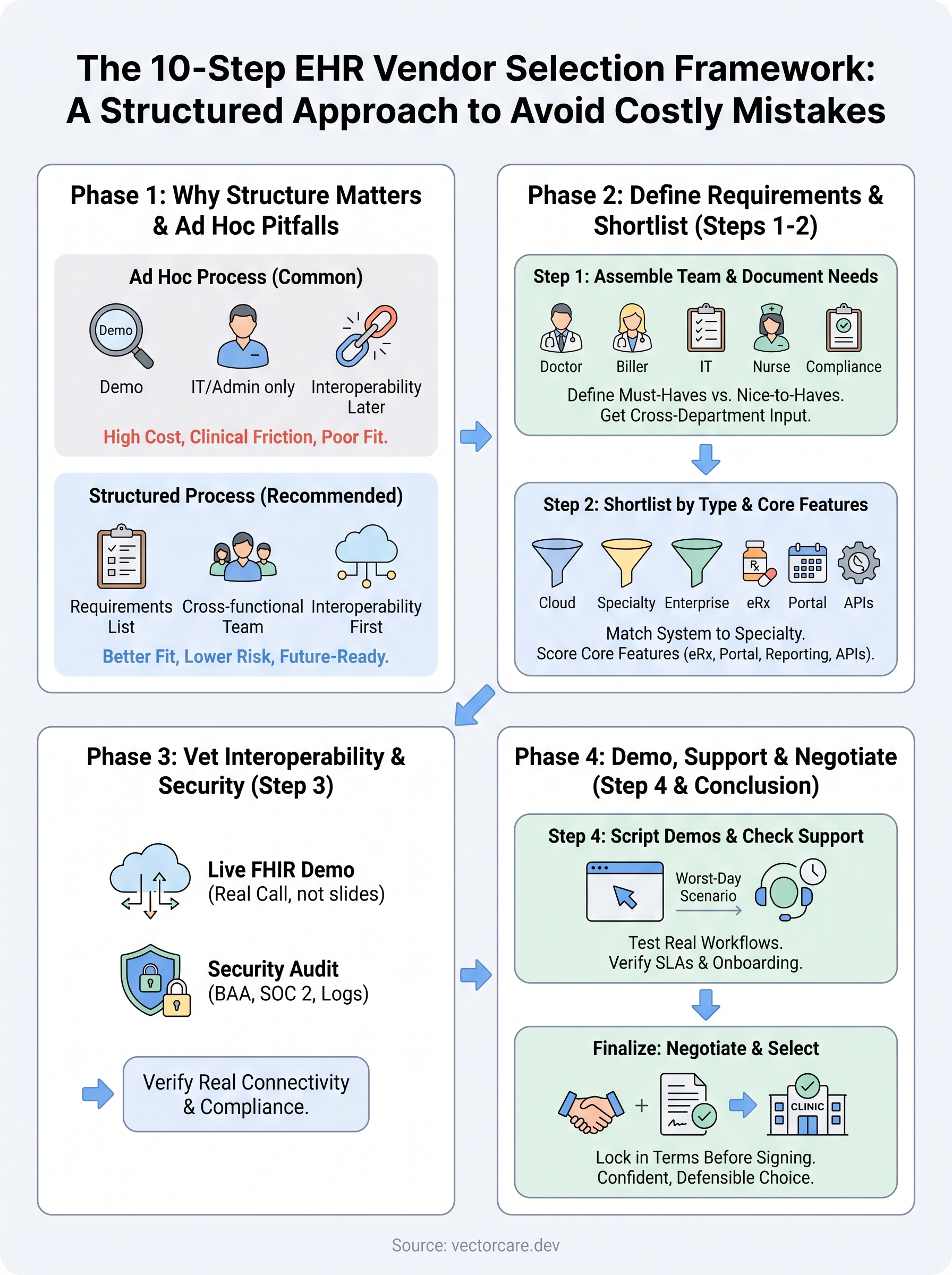
Choosing the EHR vendor that fits your practice
Running through all ten steps takes real time, but that time buys you years of avoided rework, cleaner claims, and staff who trust the system instead of fighting it. Structured selection beats gut instinct every time because it forces every vendor to prove their claims against your actual requirements, not their sales deck. The practices that skip this process end up locked into contracts that don't fit their workflow, their specialty, or their compliance needs, and they pay for that mistake for a decade.
Once you've picked your EHR, whether that's EPIC or another major platform, the work doesn't stop. Your practice will keep adding connected apps for remote monitoring, referrals, and clinical decision support, and those tools need solid FHIR and OAuth foundations to plug in cleanly. If you're building one of those apps yourself, see how VectorCare helps you build and deploy a SMART on FHIR app in days on EPIC.